> ## Documentation Index
> Fetch the complete documentation index at: https://docs.cultureai.dev/llms.txt
> Use this file to discover all available pages before exploring further.
# Product overview
> The main CultureAI workflows and how they fit together
# Product overview
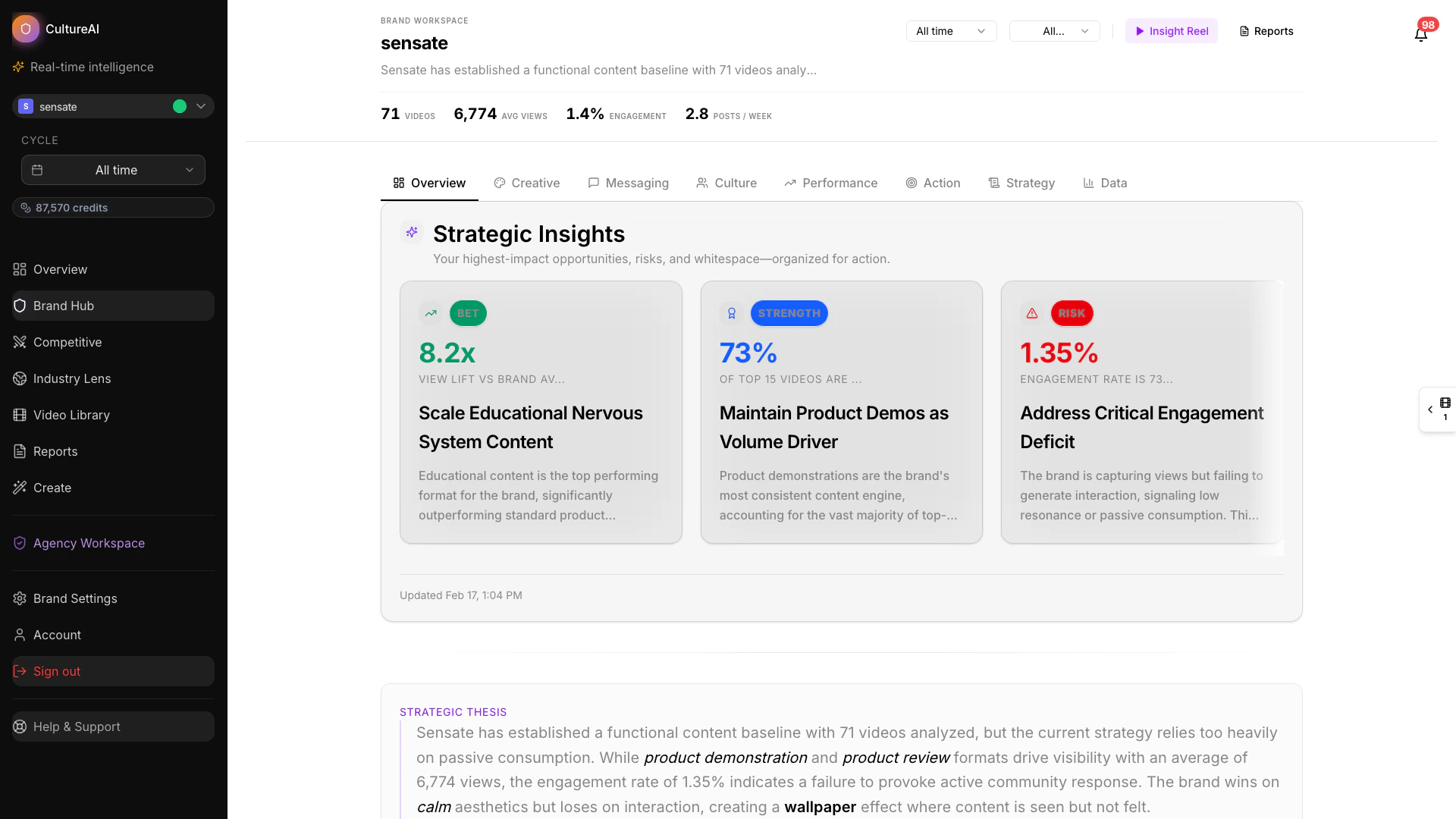
CultureAI is built to help teams understand performance, read the market more clearly, and turn insight into action. The product combines analysis, exploration, and creation so you can move from question to decision without switching contexts.
 ## The main parts of the product
See brand, competitor, and industry context in one view.
Track your brand's performance, messaging, and action priorities.
Understand market-wide movement and benchmarks.
Ask questions in plain language and explore findings faster.
Turn opportunities and insights into new creative directions.
Benchmark your brand against the competitors that matter most.
Understand broader themes and movement across the category.
Compare ranking and engagement efficiency at a glance.
Evaluate creators and audience signals with richer context.
Prioritize whitespace and strategic actions.
## How teams typically use CultureAI
Most teams follow a simple flow:
1. Review the market, the brand, or the competitor landscape.
2. Identify the patterns that matter most.
3. Use reports or Copilot to sharpen the opportunity.
4. Turn the findings into action through planning or creation.
**For CMOs and marketing leaders:** Use the Overview dashboard and reports to build a view of performance, competitive position, and market movement you can take into planning cycles and leadership conversations. Reports are often the most efficient way to present CultureAI findings to stakeholders who don't use the platform directly — leadership teams, boards, or clients.
**For content and social leads:** Use Brand Hub, Content Studio, and Creator Intel to understand what's working and move faster from insight to brief. Copilot helps you explore findings and generate sharper follow-up questions without clicking through every view.
**For agency teams:** Use Competitor Hub and competitive reports to give clients a clearer picture of where they stand and what to do next. Cultural Listening and Industry Hub help you build the category context that makes recommendations land.
## Reports in the workflow
Reports help turn product exploration into something easy to share and act on. They give teams a clearer way to summarize evidence, align stakeholders, and prioritize next steps. Reports are often the most efficient way to present CultureAI findings to people who don't log into the platform — a CMO, a board, or a client.
* [How reports work](/docs/architecture/brand-reports)
* [Competitive reports](/docs/features/reports/competitive-reports)
* [Industry reports](/docs/features/reports/industry-reports)
## Supporting pages
* [Quick start](/docs/quick-start)
* [How CultureAI works](/docs/architecture/overview)
* [Data & methodology](/docs/data-methodology-overview)
* [Metrics reference](/docs/metrics-reference)
## The main parts of the product
See brand, competitor, and industry context in one view.
Track your brand's performance, messaging, and action priorities.
Understand market-wide movement and benchmarks.
Ask questions in plain language and explore findings faster.
Turn opportunities and insights into new creative directions.
Benchmark your brand against the competitors that matter most.
Understand broader themes and movement across the category.
Compare ranking and engagement efficiency at a glance.
Evaluate creators and audience signals with richer context.
Prioritize whitespace and strategic actions.
## How teams typically use CultureAI
Most teams follow a simple flow:
1. Review the market, the brand, or the competitor landscape.
2. Identify the patterns that matter most.
3. Use reports or Copilot to sharpen the opportunity.
4. Turn the findings into action through planning or creation.
**For CMOs and marketing leaders:** Use the Overview dashboard and reports to build a view of performance, competitive position, and market movement you can take into planning cycles and leadership conversations. Reports are often the most efficient way to present CultureAI findings to stakeholders who don't use the platform directly — leadership teams, boards, or clients.
**For content and social leads:** Use Brand Hub, Content Studio, and Creator Intel to understand what's working and move faster from insight to brief. Copilot helps you explore findings and generate sharper follow-up questions without clicking through every view.
**For agency teams:** Use Competitor Hub and competitive reports to give clients a clearer picture of where they stand and what to do next. Cultural Listening and Industry Hub help you build the category context that makes recommendations land.
## Reports in the workflow
Reports help turn product exploration into something easy to share and act on. They give teams a clearer way to summarize evidence, align stakeholders, and prioritize next steps. Reports are often the most efficient way to present CultureAI findings to people who don't log into the platform — a CMO, a board, or a client.
* [How reports work](/docs/architecture/brand-reports)
* [Competitive reports](/docs/features/reports/competitive-reports)
* [Industry reports](/docs/features/reports/industry-reports)
## Supporting pages
* [Quick start](/docs/quick-start)
* [How CultureAI works](/docs/architecture/overview)
* [Data & methodology](/docs/data-methodology-overview)
* [Metrics reference](/docs/metrics-reference)